What it is
While vite dev runs, the plugin serves an MCP endpoint at /__svelte-devtools/mcp (Streamable HTTP). Agents call tools on it to read what
the panels show: the busiest components, the reactive graph of one instance, sampled state changes,
render profiles, load functions and frame rate. They can also run measurement sessions to compare
before and after a change.
No tool changes your app's code or state. Two things do happen: a call keeps the runtime
in the page sampling for about a minute, and the session tools keep measurement sessions
(in memory; on disk only when asked, and delete_session removes them). Runtime data comes from the app page open in a browser,
so keep the app open while the agent works.
Connect Claude Code
Start the dev server. Once it listens, it prints the exact command to register the server with Claude Code, including the port and a token:
  svelte-devtools MCP ready — register with Claude Code:
    claude mcp add --transport http svelte http://localhost:5173/__svelte-devtools/mcp --header x-svelte-devtools-token:<token>
Run that line as printed. Every request must carry the token in the x-svelte-devtools-token header; without it the endpoint answers 403.
The token changes on every start
The token is random per dev-server start (also when Vite restarts after a config change). After a restart, register again with the newly printed line:
claude mcp remove svelte
claude mcp add --transport http svelte http://localhost:5173/__svelte-devtools/mcp --header x-svelte-devtools-token:<new token>
Project file instead of the command
claude mcp add registers the server for you only (local scope). A .mcp.json file in the project is shared with everyone who opens the project (project
scope), so never write the token into it. Claude Code expands environment variables in that
file, so read the token from one:
{
  "mcpServers": {
    "svelte": {
      "type": "http",
      "url": "http://localhost:5173/__svelte-devtools/mcp",
      "headers": { "x-svelte-devtools-token": "${SVELTE_DEVTOOLS_TOKEN}" }
    }
  }
}
Set it from the line the dev server printed, then start Claude Code:
export SVELTE_DEVTOOLS_TOKEN=<token from the printed line>
claude
The port in the URL must match your dev server.
Ask
For example, with the cart page of your app open:
The cart total on /cart looks wrong after I change the tax rate.
Use the svelte MCP server: find the busiest components, look at the
ReactivePriceChart instance, and tell me which state can affect grandTotal
and what changed when I edited the tax rate.
The agent typically starts with get_reactive_summary or list_performance_issues and follows the hints in the answers. The walkthrough shows each step with real answers.
Other MCP clients
Any client that supports Streamable HTTP with custom headers can connect. It needs two values:
- URL:
http://localhost:<port>/__svelte-devtools/mcp - Header:
x-svelte-devtools-token: <token>(from the printed line)
The server is stateless and answers with JSON. Only the Claude Code command is printed by the dev server; for other clients, use their own configuration format with these two values. To check the endpoint by hand:
curl -s http://localhost:5173/__svelte-devtools/mcp \
  -H 'content-type: application/json' \
  -H 'accept: application/json, text/event-stream' \
  -H 'x-svelte-devtools-token: <token>' \
-d '{"jsonrpc":"2.0","id":1,"method":"tools/list","params":{}}'The 20 tools
All inputs are optional unless they have no ?.
Reactivity (bounded)
New in 0.4.0. Each answer says what it covers: window, sampling, caps, page load (epoch) and whether it is stale. Start here in large apps.
get_reactive_summarytopK?: 1–200, windowMs?: 1000–60000
The busiest component instances from runtime counters over all instances, without capturing the graph: sampled state changes and renders in the window, `rows` + `other` adding up to the totals.
Counts are sampled (at most one change per state per 200 ms), not rates. State created during component init and shared .svelte.js/.ts module state are tracked; module scopes are rows with kind "module". Answered from a cache for up to 1 s.
get_reactive_scopecomponentId?: number, epoch?: string, maxNodes?: 1–5000, maxEdges?: 1–20000
$state / $derived / $effect nodes of one component instance and their direct neighbours. Without componentId: the whole-app graph, capped.
componentId requires the epoch it came from (get_live_components with includeMeta). After a reload the answer is empty with staleReason "epoch-changed". Edges mean "can affect", not a recorded cause.
get_state_timelinesince?: cursor, limit?: 1–500 (default 100), maxValueChars?: 16–32768 (default 2048)
Sampled $state changes after a cursor, with old and new values. Pass the returned `cursor` as `since` on the next call.
`reset: true` means the cursor was stale and this is the whole buffer (the latest 500). Larger values are replaced by a size summary. Timestamps are detection times.
get_capture_info—
Per dataset: how many items the DevTools hold versus what the app reported, the selection policy, and dropped counts by reason.
Read this before drawing conclusions from capped data.
Performance issues
Ranked findings across render, reactivity, load functions and frame rate.
list_performance_issuesavgRenderTimeMs?, renderCount?, loadDurationMs?, fpsDropThreshold?, effectMaxDeps? (thresholds)
Cross-cuts all metrics and returns ranked issues. Each issue names the tool to call next in `suggestedTool`.
Reads the whole-app reactive graph, capped at 5000 nodes / 20000 edges.
get_component_hotspotstopN?: 1–200 (default 20)
Top components by total render time, with render count and average per render.
get_render_profilefile: string (substring)
Render profile entries of the components whose file contains `file`.
get_reactive_graph_problemseffectMaxDeps?: number
Over-connected effects, orphan deriveds and isolated nodes, as categories instead of the full graph.
Reads the whole-app reactive graph, capped at 5000 nodes / 20000 edges.
get_load_waterfallroute?: string
SvelteKit load profiles grouped by route, with timing and data size.
get_fps_dropsthreshold?: 1–120 (default 40), sinceMs?: number
Frame-rate samples below the threshold.
Project context
What the app is made of, from static analysis and the running page.
get_project_info—
Package name and version, Svelte / SvelteKit / Vite versions, dependency lists.
get_routes—
The SvelteKit routes tree from static analysis.
get_live_componentsincludeMeta?: boolean, limit?: 1–50000
Component instances mounted in the browser, parents first. With includeMeta: `{ epoch, total, captured, truncated, components }`, limited to 1000 by default.
Component ids are only valid within that epoch (one page load).
get_component_relations—
Static import relations between .svelte components.
Measurement sessions
Measure before and after a change, then compare.
start_sessionlabel: string, persist?: boolean
Begin capturing metrics under a label. One session is active at a time.
end_sessionkeep?: "memory" | "disk" | "discard" (default "memory")
Close the active session and return its delta.
"disk" writes to node_modules/.vite-devtools-svelte/sessions/ in the project.
compare_sessionsa: session id, b: session id
Diff render, load and frame-rate metrics of two ended sessions. Each section has a verdict: improved, regressed or unchanged.
list_sessions—
Sessions in memory and on disk, most recent first.
load_sessionid: session id
The full session record, including its delta once ended.
delete_sessionid: session id
Remove a session from memory and disk.
Walkthrough: why did it update?
Real calls against the example app (examples/sample-app, a synthetic shop)
with one item in the cart. Absolute paths are replaced by <project>; long answers are shortened where marked.
Recorded by scripts/screenshots/mcp-examples.mjs in CI run 37204003993 (linux x64, Node v22.23.3) at commit 533928b (the PR #85 merge ref), with the 0.4.0 code before the version bump (package version 0.3.0 at capture), on examples/sample-app, a synthetic demo app. Absolute paths are shown as <project> / <repo>, and arrays longer than 4 are cut where marked; no value was changed.
Find where the activity is
Counters over all instances, without capturing the graph. The answer says what it covers: here 2 of 5 registered components were active, and sampledActiveMs shows that sampling ran for only 5 s of the 30 s window (the runtime samples only while a panel or an agent is reading). The price chart has not changed yet, so it is not listed.
→ get_reactive_summary json { "name": "get_reactive_summary", "arguments": { "topK": 5, "windowMs": 30000 } }← response json { "epoch": "yotxdjn137mutu4dc2", "window": { "ms": 30000, "since": 1791119166841, "until": 1791119196841, "sampledActiveMs": 5000 }, "policy": "sampled-200ms", "coverage": "component-init", "components": { "total": 5, "withActivity": 2 }, "rows": [ { "componentId": 0, "file": "<project>/.svelte-kit/generated/root.svelte", "nodes": { "state": 3, "derived": 2, "effect": 2 }, "changes": 2, "renders": 1, "renderMs": 0 }, { "componentId": 2, "file": "<project>/src/lib/components/Header.svelte", "nodes": { "state": 0, "derived": 0, "effect": 0 }, "changes": 0, "renders": 2, "renderMs": 0.1 } ], "other": { "components": 3, "nodes": 8 }, "truncated": false, "capabilities": { "valueInspection": false, "signalHistory": false, "writeCause": false }, "baseline": { "complete": true, "pendingNodes": 0 } }Get instance ids with their page load
Component ids restart on every page load, so ask for the epoch together with the ids. ReactivePriceChart is instance 14 here.
→ get_live_components json { "name": "get_live_components", "arguments": { "includeMeta": true, "limit": 50 } }← response (shortened) json { "epoch": "yotxdjn137mutu4dc2", "total": 5, "captured": 5, "truncated": false, "components": [ { "id": 0, "file": "<project>/.svelte-kit/generated/root.svelte", "name": "root", "parentId": null, "mounted": true }, { "id": 1, "file": "<project>/src/routes/+layout.svelte", "name": "+layout", "parentId": 0, "mounted": true }, { "id": 2, "file": "<project>/src/lib/components/Header.svelte", "name": "Header", "parentId": 1, "mounted": true }, { "id": 13, "file": "<project>/src/routes/cart/+page.svelte", "name": "+page", "parentId": 1, "mounted": true }, "… 1 more" ] }Look at one instance
Nodes of that instance and their direct neighbours. An edge means the source can affect the target (a current dependency), not that it caused a change. Note that the $effect has no edges although it reads grandTotal (see What the answers cover).
→ get_reactive_scope json { "name": "get_reactive_scope", "arguments": { "componentId": 14, "epoch": "yotxdjn137mutu4dc2" } }← response (shortened) json { "nodes": [ { "id": "14:taxRate", "type": "state", "name": "taxRate", "componentId": 14, "componentFile": "<project>/src/lib/components/ReactivePriceChart.svelte", "value": 0.1 }, { "id": "14:tax", "type": "derived", "name": "tax", "componentId": 14, "componentFile": "<project>/src/lib/components/ReactivePriceChart.svelte", "value": 180 }, { "id": "14:shippingFreeThreshold", "type": "state", "name": "shippingFreeThreshold", "componentId": 14, "componentFile": "<project>/src/lib/components/ReactivePriceChart.svelte", "value": 5000 }, { "id": "14:remaining", "type": "derived", "name": "remaining", "componentId": 14, "componentFile": "<project>/src/lib/components/ReactivePriceChart.svelte", "value": 3200 }, "… 4 more" ], "edges": [ { "from": "14:taxRate", "to": "14:tax" }, { "from": "14:shippingFreeThreshold", "to": "14:remaining" }, { "from": "14:shippingFreeThreshold", "to": "14:shipping" }, { "from": "14:subtotal", "to": "14:remaining" }, "… 5 more" ], "scope": 14, "epoch": "yotxdjn137mutu4dc2", "total": { "nodes": 8, "nodesKind": "registered", "edges": 9 }, "truncated": false, "edgesOmitted": 0, "computedAt": 1791119196854, "policy": "scoped" }Read the change timeline
The first call has no cursor, so reset is true and the answer holds the newest entries of the buffer. Keep the returned cursor. Old and new values are included; larger ones are replaced by a size summary.
→ get_state_timeline json { "name": "get_state_timeline", "arguments": { "limit": 5 } }← response json { "cursor": 1791119189716031, "reset": true, "changes": [ { "id": "4:running", "name": "running", "componentFile": "<project>/src/lib/components/FpsCanvas.svelte", "oldValue": true, "newValue": false, "timestamp": 1791119192900, "seq": 1791119189716016 }, { "id": "4:running", "name": "running", "componentFile": "<project>/src/lib/components/FpsCanvas.svelte", "oldValue": false, "newValue": true, "timestamp": 1791119194095, "seq": 1791119189716021 }, { "id": "0:navigated", "name": "navigated", "componentFile": "<project>/.svelte-kit/generated/root.svelte", "oldValue": false, "newValue": true, "timestamp": 1791119195295, "seq": 1791119189716030 }, { "id": "0:title", "name": "title", "componentFile": "<project>/.svelte-kit/generated/root.svelte", "oldValue": null, "newValue": "devtools-shop — vite-devtools-svelte sample", "timestamp": 1791119195295, "seq": 1791119189716031 } ], "omitted": 0, "maxValueChars": 2048 }Edit, then read only what is new
After changing the tax rate in the app from 0.1 to 0.08, pass the cursor as since: only that change comes back.
→ get_state_timeline json { "name": "get_state_timeline", "arguments": { "since": 1791119189716031, "limit": 5 } }← response json { "cursor": 1791119189716039, "reset": false, "changes": [ { "id": "14:taxRate", "name": "taxRate", "componentFile": "<project>/src/lib/components/ReactivePriceChart.svelte", "oldValue": 0.1, "newValue": 0.08, "timestamp": 1791119196895, "seq": 1791119189716039 } ], "omitted": 0, "maxValueChars": 2048 }Check how complete the data is
What the DevTools hold versus what the app reported, per dataset, with the selection policy. A total of null means unknown. Read it before drawing conclusions from capped data.
→ get_capture_info json { "name": "get_capture_info", "arguments": {} }← response json { "liveComponents": { "captured": 5, "total": 5, "truncated": false, "policy": "roots-first", "epoch": "yotxdjn137mutu4dc2" }, "renderProfiles": { "captured": 5, "total": 5, "truncated": false, "policy": "newest-mounted", "epoch": "yotxdjn137mutu4dc2" }, "stateTimeline": { "captured": 5, "total": null, "truncated": false, "policy": "sampled-200ms", "baseline": { "complete": true, "pendingNodes": 0 } }, "fpsSamples": { "captured": 12, "total": 12, "truncated": false, "policy": "tail" }, "runtimeErrors": { "captured": 0, "total": 0, "truncated": false, "policy": "tail" }, "loadProfiles": { "captured": 1, "total": 1, "truncated": false, "policy": "tail" }, "compilerWarnings": { "captured": 0, "total": 0, "truncated": false, "policy": "tail" }, "reactiveNodes": { "captured": 8, "total": 8, "truncated": false, "policy": "scoped", "epoch": "yotxdjn137mutu4dc2" }, "reactiveEdges": { "captured": 9, "total": 9, "truncated": false, "policy": "scoped", "epoch": "yotxdjn137mutu4dc2" } }After a reload, ids are refused, not guessed
After reloading the app page, the same componentId with the old epoch returns an empty graph with staleReason "epoch-changed" instead of another instance.
→ get_reactive_scope json { "name": "get_reactive_scope", "arguments": { "componentId": 14, "epoch": "yotxdjn137mutu4dc2" } }← response json { "nodes": [], "edges": [], "scope": 14, "epoch": "mv4a1o7rqhmutu4koh", "total": null, "truncated": false, "edgesOmitted": 0, "computedAt": null, "policy": "scoped", "stale": true, "staleReason": "epoch-changed" }
In a large app the same order keeps every answer small: summary first, then one instance, then only the new timeline entries.
Measure a change
Start a session, use the app, end it; do the same after your change, then compare. Each section of the comparison has a verdict. In this run nothing heavy changed between the two sessions, so every verdict is unchanged.
{
  "name": "start_session",
  "arguments": {
    "label": "before"
  }
}{
"id": "s_mutu4ia1_b33526",
"label": "before",
"startedAt": 1791119198089,
"persist": false
}{
"name": "compare_sessions",
"arguments": {
"a": "s_mutu4ia1_b33526",
"b": "s_mutu4jfy_6d6dd6"
}
}{
"a": {
"id": "s_mutu4ia1_b33526",
"label": "before"
},
"b": {
"id": "s_mutu4jfy_6d6dd6",
"label": "after"
},
"render": {
"totalRenderTimeDeltaA": 0,
"totalRenderTimeDeltaB": 0,
"diff": 0,
"verdict": "unchanged"
},
"load": {
"avgA": 0,
"avgB": 0,
"diff": 0,
"verdict": "unchanged"
},
"fps": {
"avgA": 60,
"avgB": 60,
"diff": 0,
"verdict": "unchanged"
}
}Sessions live in memory for the life of the dev server. end_session with keep: "disk" writes them to node_modules/.vite-devtools-svelte/sessions/ in your project.
What the answers cover
- Sampled. State is checked every 200 ms; several writes within one sample count once. Counts are not totals or rates.
- Component state only. State created during a component's init is
tracked; module-level state in
.svelte.tsfiles is not. - Can affect, not caused. Edges are current dependencies. Which write changed a value is not recorded.
- Some dependencies are missing. An
$effectmay show no incoming edges even when it reads state. - Values are summaries in the graph. Objects and arrays appear as
(object),[n]or{n}. The timeline includes values up tomaxValueChars. - No per-signal history. The timeline keeps the latest 500 sampled changes across all signals.
- Caps. Graphs stop at 5000 nodes and 20000 edges and say so (
truncated,total,edgesOmitted);get_capture_inforeports what was dropped and why. - One page load. Component ids are valid within one epoch. Answers may
come from a cache for up to 1 s;
computedAtandwindow.untilsay when they were computed.
Performance with very large apps has not been measured; no size is promised.
The same data in the panel
The Reactivity panel shows the answers above to people. Screenshots of the real runtime on the example app, taken in CI.
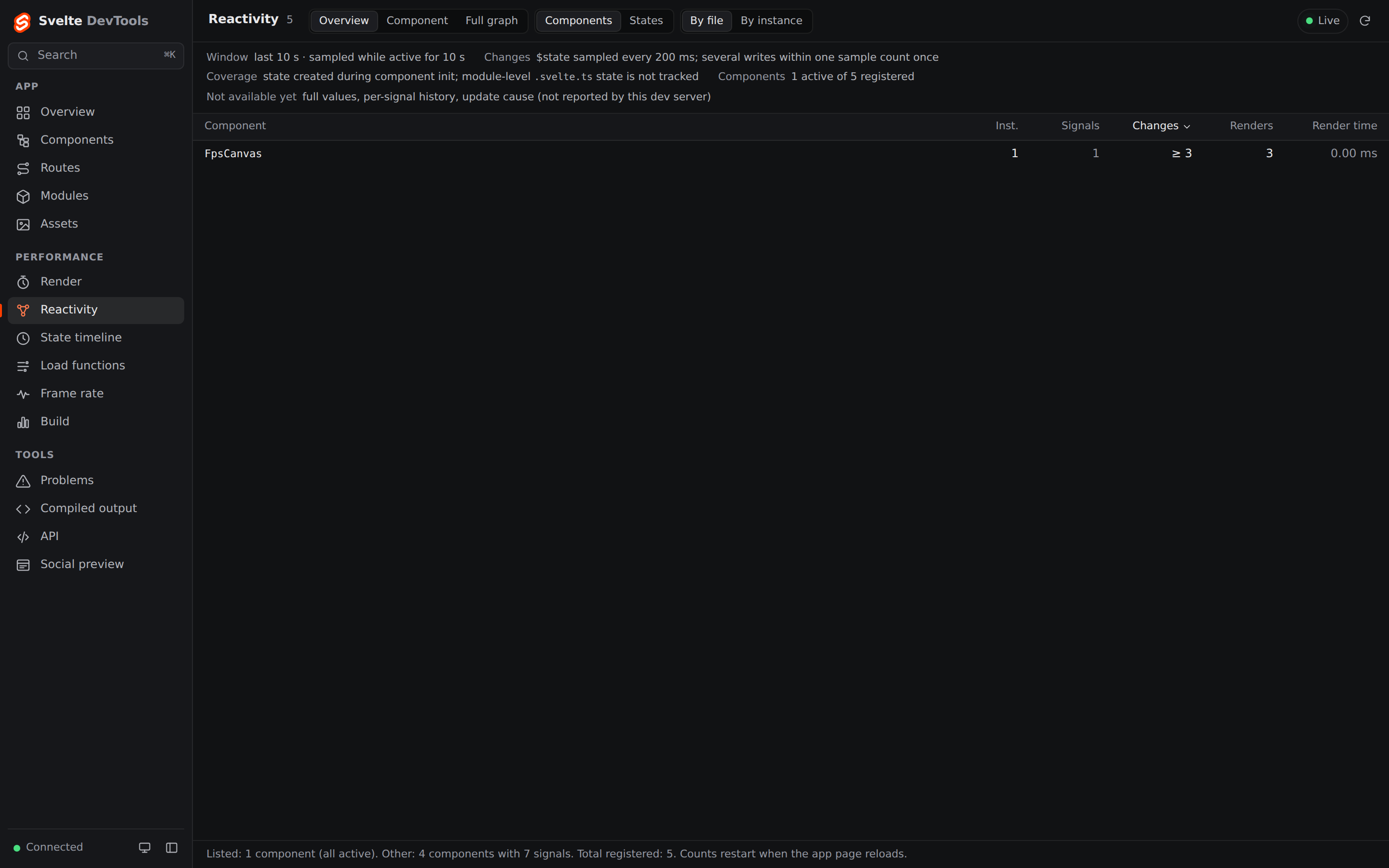
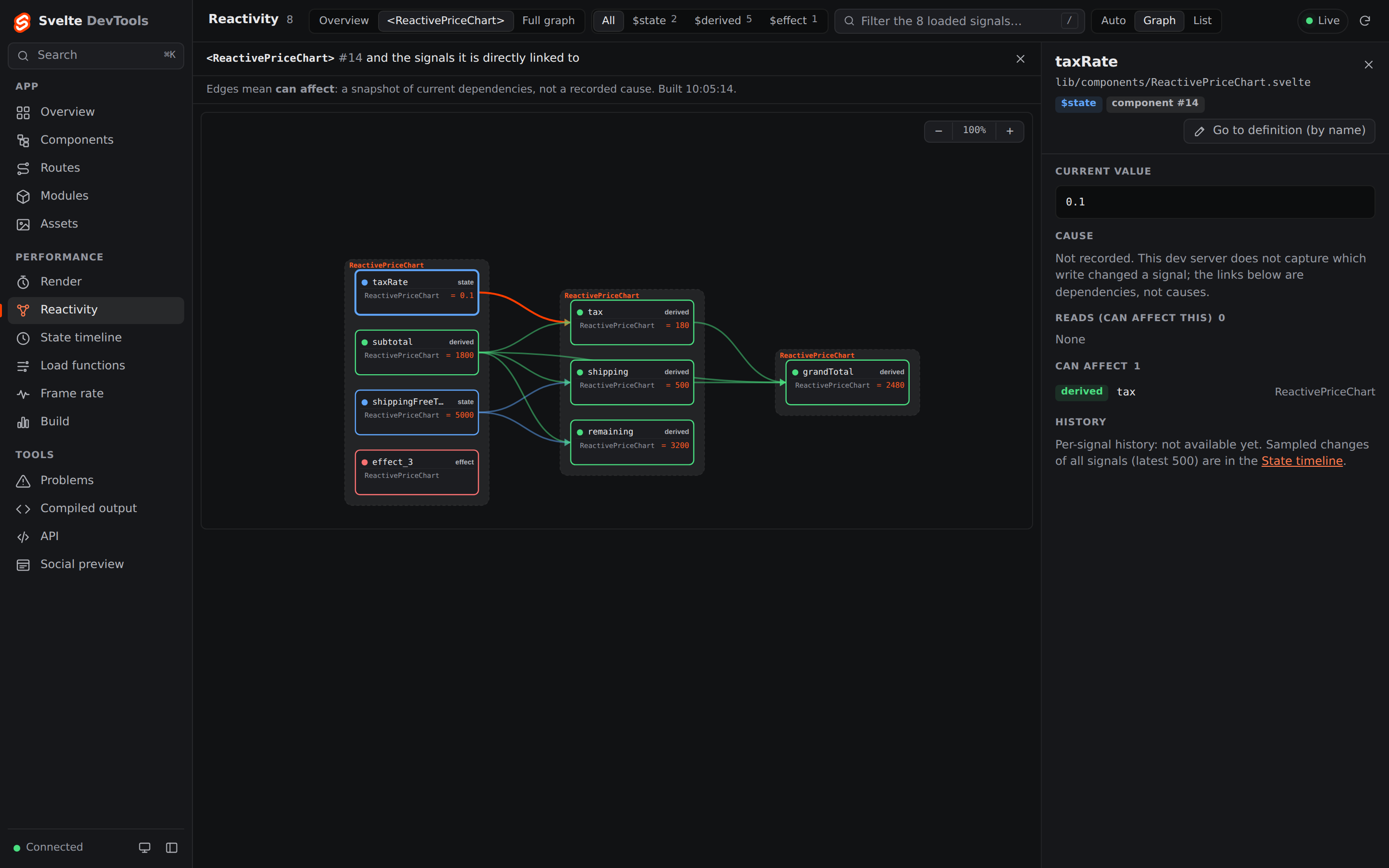
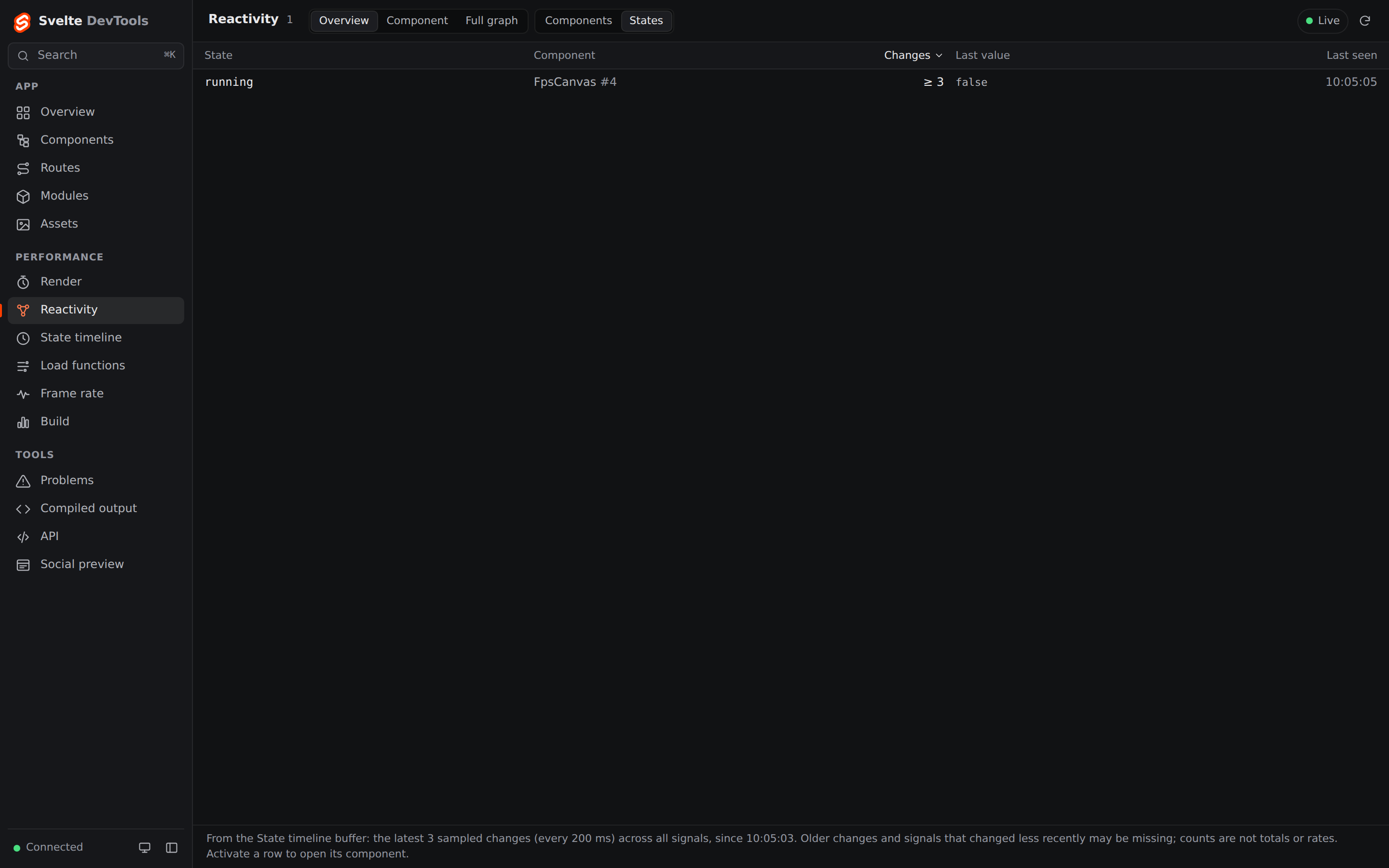
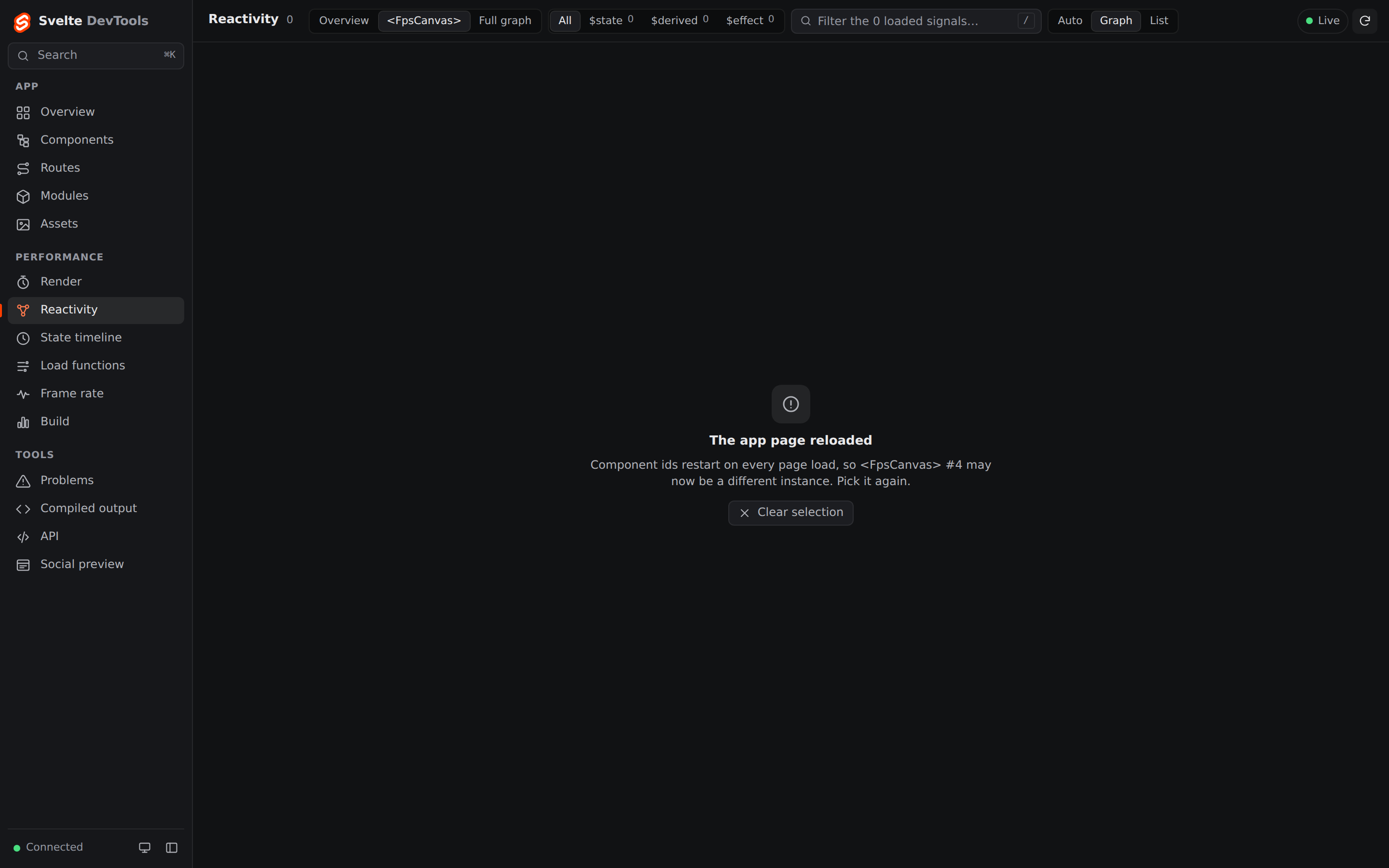
Captured by scripts/screenshots/reactivity.mjs in CI run 37193781813 (Linux,
headless Chromium, 1440×900) on the PR merge commit 623e27a, whose client sources are
those of a42a9e4, on examples/sample-app (a synthetic demo app) with the real runtime.
Troubleshooting
403 Forbidden- The token is missing or from an earlier start. Register again with the line the dev server printed last.
- Empty answers with
staleReason: "no-runtime" - No app page is connected. Open the app in a browser and call again.
staleReason: "timeout"- The app page did not answer within 1 s. The answer is the previous one (with its own
computedAt) or empty; call again. staleReason: "epoch-changed"- The page reloaded. Call
get_live_componentswithincludeMeta: truefor new ids and their epoch. componentId requires epoch- Pass the epoch from the same
get_live_componentsanswer. - No components or reactive nodes
- Check that
componentTrackingis not set tofalseand that the plugin comes beforesveltekit()invite.config.ts. - Several app tabs
- The answers follow the page that reported most recently; close the others.
Security
- The endpoint exists only in the dev server. Production builds don't contain it.
- Every request needs the token. It is random per start and printed only in your terminal. Treat it like a password and don't commit it.
- The token is separate from the browser sign-in of the panels (the one-time code). MCP clients are local processes, so the browser origin is not checked; the token is the gate.
get_state_timelinereturns real state values of your running app, so the agent sees them. Keep secrets out of dev state, or don't use that tool.- When the dev server listens on the network (
--host), so does the endpoint. Prefer localhost. - Sessions are written to disk only with
persistorkeep: "disk", undernode_modules/of the project.
Versions
- vite-devtools-svelte
- ≥ 0.4.0 for this guide and the four reactivity tools
- Vite
- ≥ 8.3.2
- Svelte
- 5 (runes mode); plain Svelte, SvelteKit 2 and Kit 3 are tested in CI
- MCP
- Streamable HTTP, stateless, JSON responses. CI calls the endpoint with plain HTTP (
initialize,tools/list,tools/call).